
Consumer settings
The settings section in Consumer is also divided into different subsections, according to the user's needs for this platform.
User profile
- As a user, I want to update my details
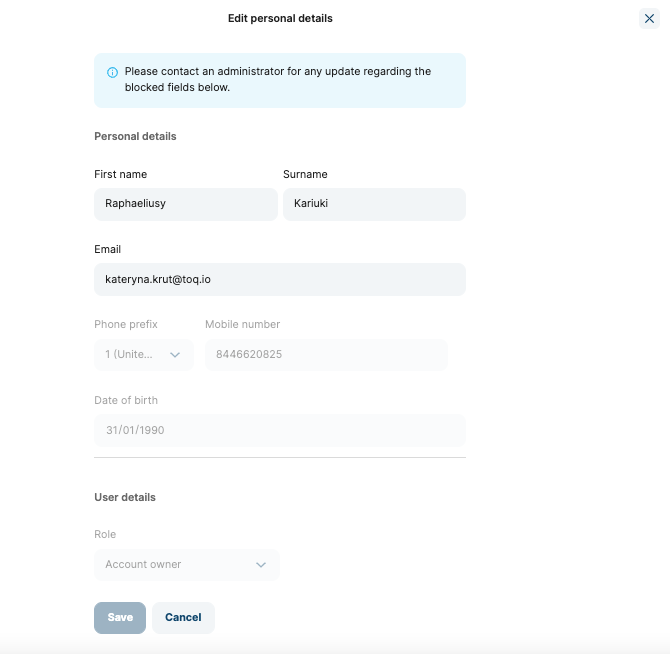
- Fields included in each subsection are the following ones: Fields that cannot be edited are marked and cannot be edited unless you contact Toqio support
- Personal details:
- First name (can be edited)
- Surname (can be edited)
- Email (can be edited)
- Validation: Invalid email
- Mobile number
- Date of birth
- Address (can be edited)
- User details:
- Role
- Upload profile picture:
- Will be visible in the Director's card list by the cardholder
- Personal details:
- Fields included in each subsection are the following ones: Fields that cannot be edited are marked and cannot be edited unless you contact Toqio support
- As a user, I want to manage my notifications settings -> same asSME settings.
- As a user, I want to set the default language in the app -> same asSME settings.
- As a user, I want to delete my profile -> same asSME settings.
Security
Same as SME settings.
Credit cards (if applicable)
Same as SME settings.
General
- As a user, I want to update the default currency in the platform -> same asSME settings.
- As a user, I want to see the other banks I am connected with (PSD2 regulation; TellMoney integration) -> same asSME settings.
Updated about 1 year ago